
Know your limits before the market tests them
Free calculators for funded-account traders: how much room you have left today, what lot size fits your stop, and what pace a profit target asks for. Built around The5ers rules.
- Built around The5ers rules
- Independent of The5ers
- Free, no account
Example: a High Stakes 100K account that started the day at $101,000. The daily floor moves with each day. The max loss floor does not.
Two limits, one account
A good strategy can still lose an account that breaks a limit. Most plans give you two limits, and they behave differently.
The max loss floor
A line under your account that ends it if equity touches it. On a static plan it is fixed from your starting balance and never moves. Some plans trail it upward instead, so check yours.
The daily loss floor
A line that resets each day. It sits a set distance under where your day began, so it climbs after a good day and drops after a bad one. The start point and reset time are worth confirming.
Three calculators, one for each decision
Open the one that matches the decision in front of you.
The5ers Daily Loss and Drawdown Calculator
See how much of today’s limit and of your max loss you still have, using the The5ers plan rules.
- How much of today’s limit is left?
- How far am I from the max loss level?
- How do the limits differ between plans?
The5ers Position Size Calculator
Turn a stop and a risk amount into a lot size, then check the trade against your daily and max loss.
- What lot size risks this amount from this stop?
- How many losses like this can I take?
- Does this trade fit inside my limits?
Challenge Target Pace Calculator
See the pace a challenge profit target asks of you before you start trading toward it.
- What pace does my target ask for?
- Is that pace realistic at my risk per trade?
The5ers plans, side by side
The numbers our calculators use, in one place.
| Plan | Steps | Profit target | Max loss | Daily limit | Leverage |
|---|---|---|---|---|---|
| High StakesClassic, 2 steps | 2 | 8%, then 5% | 10%, static, on equity | 3% | 1:100 |
| Hyper Growth1 step | 1 | 10% | 6% | 3% (Daily Pause) | 1:30 |
| Pro Growth1 step | 1 | 10% | 6% | 3% (Daily Loss) | 1:30 |
| Bootcamp3 steps, then funded | 3 | 6% each step, 5% funded | 5% each step, 4% funded | Not shown on the plan table | 1:30 |
Source: The5ers public plan tables for MetaTrader accounts in USD. We checked High Stakes against a live account dashboard. The other plans come from the plan tables only. Plans, names and numbers change, so confirm everything on the5ers.com before you buy. The daily limit start point and reset time can differ between plans.
Seven checks worth ten minutes
Tick them off as you go. Nothing is saved or sent.
0 of 7 checked
More tools for any funded account
These work with any account. They are also useful when you plan a challenge.
- Drawdown Recovery CalculatorThe gain needed to recover from a loss, with a prop account tab.
- Risk of Ruin CalculatorThe odds a plan touches your ruin line, with stress tests.
- Expectancy CalculatorEdge per trade and the losing streak to expect.
- Risk/Reward CalculatorR:R, dollars at risk and the effect of spread.
- Position Size CalculatorLot size for any forex account, not tied to one firm.
All 21 calculators are in the tools hub.
Read the rules first, then decide
If you decide to try The5ers, you can use our link. We may earn a commission if you buy through it. It changes nothing in our tools, and it is not a promise that you will pass.
Affiliate link. See the Affiliate Disclosure. These tools are not made or endorsed by The5ers. Trading carries a risk of loss; read the Risk Disclaimer.
Watch your limits while you trade
The calculators plan the trade. Our MT5 utility can watch the account while it runs.
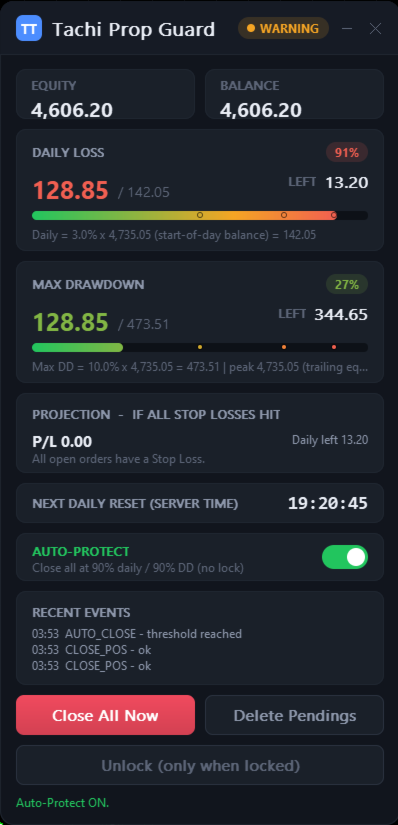
Tachi Prop Guard
Tracks your daily loss and max drawdown against the limits you set, as a percent or an amount, with static or trailing drawdown. Monitor mode warns you. Protect mode can close trades and lock trading until your reset time.
Limits: it cannot stop another EA’s order before that order is sent, it cannot promise a fill on a gap or over the weekend, it does not guarantee you pass a challenge, and it gives no signals. MT5 only.
Our own product, and we earn money if you buy. To size trades on the chart, there is also Lot Architect for MT5 and MT4, which does not read prop firm rules.
Questions about prop firm tools
Are these tools made by The5ers?
No. They are independent tools from TachiTrade. We build them from The5ers’ public pages and check High Stakes against a live account dashboard. The firm’s own rules always win, so confirm them on the5ers.com.
Why only The5ers?
Rules differ between firms and change often. Building around one firm lets us keep the numbers right instead of approximate. The general tools in our tools hub work with any account.
Will these tools help me pass a challenge?
They help you size trades and see your limits, and nothing more. No tool can promise a pass or a funded account. Your plan and your discipline decide that.
What is the difference between static and trailing drawdown?
A static max loss is a fixed floor set from your starting balance. A trailing max loss moves up as your balance or equity reaches new highs. Check which one your plan uses, and what it is measured on.
Do you earn money if I buy through your link?
Yes. We are a The5ers affiliate and may earn a commission if you buy through our link. Read the Affiliate Disclosure.
Can a tool stop me from breaking a rule?
The calculators cannot. Tachi Prop Guard can watch your limits on MT5 and, in Protect mode, close trades and lock trading, within the limits listed above.
How our tools are built: Methodology. Educational tools, not financial advice.