
The5ers Position Size Calculator
Get the lot size for your stop and your risk, then see whether the trade fits the room you have left before the daily loss and max loss limits.
Position size for your prop account
Fill the two blocks. The ticket on the right updates as you type.
Order ticket
Estimates only. Spread, slippage and gaps are not included. Independent tool, not an official The5ers tool. See the methodology and the risk disclaimer. Nothing you type is sent to our servers.
I size from the room left, not from the balance
When I trade funded accounts, the number that matters most on a given morning is not the account size. It is how far my equity is from the nearest limit. A 0.5% risk is fine with $3,000 of daily room. The same trade is a different decision when a bad morning has cut that room to $800.
So I decide in this order: stop first, risk second, lots last. The stop comes from the chart. The risk is a small share of the starting balance. The lot size is whatever makes those two true, rounded down. Then I check the result against the room left, and I do not let a single trade use more than about half of it.
This is one way to work, not advice. Your plan may differ. The calculator lets you change every setting, including the safety cap.
How many losing trades does your risk buy you?
Numbers of losses in a row that reach each limit, if every trade risks the same percentage of the starting balance. Simple fixed risk, no compounding.
| Risk per trade | To reach 3% daily | To reach 6% max | To reach 10% max |
|---|---|---|---|
| 0.25% | 12 | 24 | 40 |
| 0.50% | 6 | 12 | 20 |
| 0.75% | 4 | 8 | 14 |
| 1.00% | 3 | 6 | 10 |
| 1.50% | 2 | 4 | 7 |
| 2.00% | 2 | 3 | 5 |
What the table shows
At 1% per trade, three losses in one day reach a 3% daily limit. At 0.5% it takes six. The daily limit is usually the first one you meet, not the max loss.
The 6% column is for 1-step programs such as Hyper Growth and Pro Growth. The 10% column is for High Stakes. Real results also depend on spread and slippage, so treat each number as a best case.
Four trades on the same $100,000 account
High Stakes, 0.5% risk of the starting balance ($500), safety cap 50%. Numbers are rounded for clarity.
- Loss of 1 lot
- $5.00 x 100 oz = $500
- Risk
- $500
On gold, every $1.00 of price is $100 per lot.
- Loss of 1 lot
- 20 pips x $10 = $200
- Risk
- $500
Pairs quoted in USD pay $10 per pip per lot.
- Loss of 1 lot
- 0.25 x 100,000 = 25,000 JPY = $166.67
- Risk
- $500
The loss is in JPY, so it is converted to dollars at the price.
- Equity
- $97,800 (down $2,200 today)
- Room to daily level $97,000
- $800
- Cap: 50% of room
- $400 (below $500)
Same trade, smaller size, because the room is smaller.
Which limits does the calculator use?
| Program | Max loss | Daily | Leverage |
|---|---|---|---|
| High Stakes | 10% | 3% | 1:100 |
| Hyper Growth | 6% | 3% (Daily Pause) | 1:30 |
| Pro Growth | 6% | 3% (Daily Loss) | 1:30 |
| Bootcamp | 5% per step, 4% funded | Not shown | 1:30 |
Last verified: October 9, 2026, from The5ers’ public plan table (MetaTrader, USD). Rules change. Confirm on the5ers.com and in your dashboard. The full table is on the drawdown calculator.
What the calculator assumes per 1.00 lot
Common defaults. Your broker can differ, so check the Specification of the symbol in MT5.
| Instrument | Contract size | Stop typed as | Loss per 1.00 lot |
|---|---|---|---|
| XAUUSD | 100 oz | $ price move | $100 per $1.00 |
| XAGUSD | 5,000 oz | $ price move | $5,000 per $1.00 |
| EURUSD, GBPUSD, AUDUSD, NZDUSD | 100,000 | pips (0.0001) | $10 per pip |
| USDJPY | 100,000 | pips (0.01) | 1,000 JPY per pip, converted at the price |
| USDCHF, USDCAD | 100,000 | pips (0.0001) | 10 CHF or CAD per pip, converted at the price |
Need to know what one pip, point or tick is worth for gold? Use the XAUUSD Pip / Point / Tick Value Calculator.
A six-point check before every entry
- Equity, not balance. Floating losses already use your room.
- Which limit is closest? The daily limit usually is.
- Stop first. Place it where the idea is wrong, then size the trade.
- Twice. Could you take this loss twice today and still be inside the limits?
- Other open trades. EURUSD and GBPUSD often move together, so their risks add up.
- Specs. Contract size and lot step match your MT5 Specification.
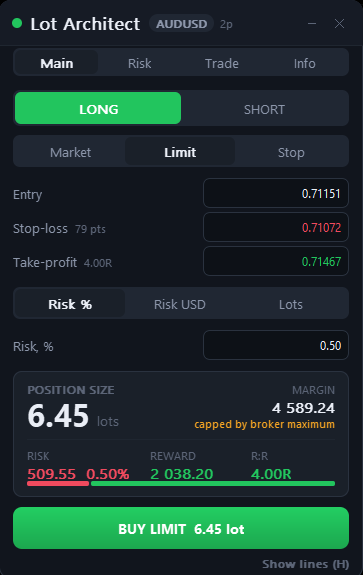
The same sizing math, on your chart
This page gives you the number. Lot Architect is my trade panel for MetaTrader that does it where you trade, so you do not retype your stop every time.
- Long or short, with market, limit or stop orders
- Size by risk %, risk in USD or fixed lots
- Drag entry, stop-loss and take-profit lines on the chart
- Shows position size, margin, risk, reward and risk to reward live
- The order button shows the lot it will send. Press H to hide the lines
Lot Architect is my own product on the MQL5 Market. If you buy it, I earn money. This calculator stays free either way. Lot Architect does not read your prop firm’s rules, so keep checking your limits.
Want your limits watched live? Tachi Prop Guard is my MetaTrader 5 risk manager for prop accounts. It tracks daily loss and drawdown and can close trades when you set it to. It cannot guarantee fills or a passed challenge. See how the limits are calculated in the drawdown calculator.
Tachi Prop Guard for MT5Position sizing questions
How do I calculate lot size for a prop firm account?
Should I risk a percentage of the balance or of the room left?
Why did the calculator lower my risk?
Why are lots rounded down and not to the nearest step?
Are the contract sizes the same on my The5ers MT5 account?
Can I use it for indices, oil or crypto?
Are spread and slippage included?
Does Lot Architect know my prop firm’s limits?
Is this an official The5ers tool?
Keep going
More utilities for MetaTrader by TachiTeam: MQL5 seller page (my own products, I earn money if you buy). Trading is risky and this is not financial advice. Read the risk disclaimer and the affiliate disclosure.