
Forex Market Hours: Live Session Clock in Your Time Zone
See which of the Sydney, Tokyo, London and New York sessions are open in your own time zone, turn broker server time into your time, and sort your own trades by session. The hours are the usual business-hours convention, not official hours, and you can edit them.
By PA, TachiTrade. Last checked October 10, 2026. How my tools are built
Drag across the bars to preview another time. The gold needle is the moment shown in the big clock. The hatched area means the forex week is closed.
Broker server time and my time
Find my broker offset
Open a chart on a weekday, read the open time of the newest M1 candle and type it here. I compare it with the UTC clock and round to the nearest half hour.
One moment, every city
Paste one trade per line: the time you entered, then the result as the last number on the line. A date before the time is best, for example 2026-10-05 14:30, +1.8. Without a date I use today’s date, which can misplace trades across a daylight saving change. Everything is worked out in your browser and nothing is uploaded.
Check what is open
Read the live clock, or drag the needle to see any other moment of the day.
Convert broker time
Turn server time into your time, or find your broker’s offset from your own chart.
Audit your sessions
Paste your trades and see which window they actually fall in.
The London and New York overlap is not always four hours
The United Kingdom and the United States change their clocks on different dates. In 2026 the UK goes back on October 25 and the US goes back on November 1. For that one week London is already on winter time while New York is still on summer time, so the two sessions overlap for five hours instead of four.
The same thing happens in spring, between the US change on March 14 and the UK change on March 28, 2027. Sydney moves on its own dates, the first Sunday of April and October, which shifts the Asian side of the clock too.
| Period | Sydney (UTC) | London (UTC) | New York (UTC) | Overlap (UTC) | 24 hours |
|---|---|---|---|---|---|
| Oct 4 to 24, 2026 Current setup (Sydney moved forward on October 4) | 21:00–06:00 | 07:00–16:00 | 12:00–21:00 | 12:00–16:00 4 hours | |
| Oct 25 to 31, 2026 UK clocks go back | 21:00–06:00 | 08:00–17:00 | 12:00–21:00 | 12:00–17:00 5 hours | |
| Nov 1, 2026 to Mar 13, 2027 US clocks go back | 21:00–06:00 | 08:00–17:00 | 13:00–22:00 | 13:00–17:00 4 hours | |
| Mar 14 to 27, 2027 US clocks go forward | 21:00–06:00 | 08:00–17:00 | 12:00–21:00 | 12:00–17:00 5 hours | |
| Mar 28 to Apr 3, 2027 UK clocks go forward | 21:00–06:00 | 07:00–16:00 | 12:00–21:00 | 12:00–16:00 4 hours | |
| Apr 4 to Oct 2, 2027 Sydney clocks go back | 22:00–07:00 | 07:00–16:00 | 12:00–21:00 | 12:00–16:00 4 hours |
Default hours: 08:00 to 17:00 local in Sydney, London and New York. Tokyo has no daylight saving, so with 09:00 to 18:00 it stays at 00:00 to 09:00 UTC all year and I left it out of the table, but it is in the strips. I worked these out with the IANA time zone database for each period, using one weekday inside it. The highlighted rows are the weeks with the longer overlap. In the strips, the top three-quarters show the four sessions and the light bar at the bottom is the London and New York overlap.
The week itself follows New York. By the usual convention it opens on Sunday at 5 p.m. New York time, which is 21:00 UTC while the US is on summer time and 22:00 UTC otherwise, and it closes at the same hour on Friday.
When London and New York start where you are
If your time zone is on the list, you can read the opens straight off the table. Each cell shows January first and July second, because that is when London and New York are both on the same kind of time. A small +1 means the next calendar day. For Sydney and Auckland, January is southern summer and July is southern winter. For anywhere else, use the live clock above.
| Time zone | London open (Jan / Jul) | New York open (Jan / Jul) | Overlap (Jan / Jul) |
|---|---|---|---|
| Ho Chi Minh City UTC+7 | 15:00 / 14:00 | 20:00 / 19:00 | 20:00–00:00+1 / 19:00–23:00 |
| Singapore UTC+8 | 16:00 / 15:00 | 21:00 / 20:00 | 21:00–01:00+1 / 20:00–00:00+1 |
| Tokyo UTC+9 | 17:00 / 16:00 | 22:00 / 21:00 | 22:00–02:00+1 / 21:00–01:00+1 |
| Sydney UTC+11 / +10 | 19:00 / 17:00 | 00:00+1 / 22:00 | 00:00+1–04:00+1 / 22:00–02:00+1 |
| Auckland UTC+13 / +12 | 21:00 / 19:00 | 02:00+1 / 00:00+1 | 02:00+1–06:00+1 / 00:00+1–04:00+1 |
| Mumbai UTC+5:30 | 13:30 / 12:30 | 18:30 / 17:30 | 18:30–22:30 / 17:30–21:30 |
| Dubai UTC+4 | 12:00 / 11:00 | 17:00 / 16:00 | 17:00–21:00 / 16:00–20:00 |
| Istanbul UTC+3 | 11:00 / 10:00 | 16:00 / 15:00 | 16:00–20:00 / 15:00–19:00 |
| Johannesburg UTC+2 | 10:00 / 09:00 | 15:00 / 14:00 | 15:00–19:00 / 14:00–18:00 |
| London UTC+0 / +1 | 08:00 | 13:00 | 13:00–17:00 |
| Sao Paulo UTC−3 | 05:00 / 04:00 | 10:00 / 09:00 | 10:00–14:00 / 09:00–13:00 |
| New York UTC−5 / −4 | 03:00 | 08:00 | 08:00–12:00 |
| Los Angeles UTC−8 / −7 | 00:00 | 05:00 | 05:00–09:00 |
London opens at 08:00 and New York at 08:00 local time. The overlap runs from the New York open to the London close at 17:00. If both cells in a row are the same, the zone moved its clocks in step with London or New York.
The daily-loss clock matters more than the session clock
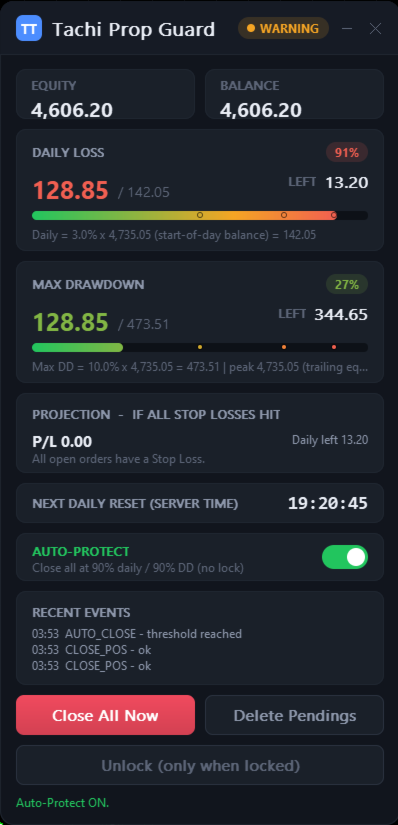
A prop firm sets its own time for the daily-loss reset, and it is not always your calendar midnight. Check your firm’s rules for the exact time. Tachi Prop Guard for MT5 tracks daily loss and max drawdown against the limits you enter, lets you set the reset time by time zone, and runs in two modes: Monitor only warns you, and Protect can close trades, delete pending orders and lock trading until the next reset.
What it cannot do: it cannot stop another EA’s order before that order is sent, because MT5 has no pre-trade hook. It cannot guarantee fills across gaps or the weekend, it does not guarantee you pass a challenge, and it gives no trade signals.
This is my own product, and I earn money if you buy it. To see how daily loss works on The5ers, try the drawdown calculator.
Read your broker’s time off your own chart
Charts in MetaTrader use the broker’s server time, not your computer’s clock. One common setup is GMT+2 in winter and GMT+3 in summer, shifted to follow US daylight saving so the daily candle closes at 5 p.m. New York. Other brokers follow European daylight saving or use a fixed offset.
I do not list brokers one by one because setups change. Reading it off your own chart takes a minute and is always right for your account.
What a session does and does not tell you
A filter, not a signal
I treat session times as a filter. When more of the market is awake, spreads and moves are often different from quiet hours, but “often” is doing real work in that sentence. It depends on the pair, the day and the news calendar.
The only way to know how you trade is to measure it, which is what the third tab is for. Tag your trades, paste them in, and see which window you actually make money in.
Mind the sample size
A window with ten trades can look great or terrible on two outcomes.
The expectancy calculator shows how wide the range of outcomes is for a given edge, and the risk reward calculator shows what spread does to a plan before you place it.
Quick answers
When is the forex market open?
Around the clock on weekdays. By the usual convention the week opens on Sunday at 5 p.m. New York time and closes on Friday at 5 p.m. New York time, which is 21:00 or 22:00 UTC depending on US daylight saving. Brokers can differ a little, so confirm with yours.
Are the sessions official?
No. Forex is an over-the-counter market with no official opening bell. The sessions on this page follow local business hours in each financial centre, and you can change the hours in the Live clock tab.
When do the sessions overlap?
With the default hours, Tokyo and London share one to two hours, and London and New York share four hours, or five in the weeks when only one of them has changed its clocks. Sydney and Tokyo share most of their day. The table above has the exact UTC hours.
What is the best time to trade gold?
There is no single answer. Many traders find gold most active when London and New York are both open, so the overlap is the window most people check first. That is a starting point, not a rule. Paste your own trades into the third tab to see your pattern.
Does the market stop during the day?
Not as a market, but many brokers have a short daily break or rollover around 5 p.m. New York time, when spreads can widen and some symbols can pause. The exact time is in each broker’s trading specifications.
Why is the overlap five hours this week?
Only one of the two countries has changed its clocks. In 2026 that is October 25 to 31, after the UK goes back and before the US does. It repeats from March 14 to 27, 2027, when the US has moved forward and the UK has not.
How do I find my broker’s server time?
Look at the open time of the newest M1 candle on a weekday, then use the Find my broker offset box on the Convert tab. It gives you the offset to UTC, and you can send it to the converter with one click.
How many trades do I need before session stats mean anything?
More than most people expect. I would want a few dozen in a window before leaning on it, and I would still treat the result as something to test, not an answer. Rows marked small sample have fewer than 20 trades.
Related tools
Expectancy Calculator
Edge per trade, profit factor and the losing streak to expect. It uses the same pasted-trades idea as the third tab.
Risk Reward Calculator
R:R, dollars at risk and what spread and commission do to a plan.
The5ers Drawdown Calculator
Daily loss and max loss levels, which have their own reset clock.
My own indicators and EAs are on MQL5: tachiteam on MQL5. They are my own products, and I earn money if you buy.
This is an educational tool, not financial advice. Trading leveraged products such as forex and CFDs carries a high risk of loss. Read the risk disclaimer. TachiTrade is independent and is not affiliated with any broker or prop firm mentioned here. Session times are a convention, and your broker’s hours and server time come first.