
The5ers Daily Loss & Drawdown Calculator
See exactly how much room you have left before the daily loss limit or the max loss limit, and check whether your next trade is safe. Built for High Stakes, Hyper Growth, Pro Growth and Bootcamp.
- Free, no sign-up
- Runs in your browser
- Independent, not an official tool
- Rules last verified Oct 9, 2026
The5ers Daily Loss & Drawdown Calculator
Estimates only. Rules change and can differ by account, so confirm yours in your dashboard. Independent tool, not an official The5ers tool. See the methodology and the risk disclaimer. Nothing you type is sent to our servers.
The5ers rules at a glance
Taken from The5ers’ public plan table (MetaTrader, USD). Last verified: October 9, 2026. Rules and promotions change, so always confirm them on the5ers.com and in your dashboard.
| Program | Profit target | Max loss | Daily limit | Leverage |
|---|---|---|---|---|
| High Stakes (Classic) 2 steps | 8%, then 5%. Funded 10% | 10% of starting balance | 3% | 1:100 |
| High Stakes (10% version) 2 steps | 10%, then 5%. Funded 10% | 10% of starting balance | 3% | 1:100 |
| Hyper Growth 1 step | 10% | 6% of starting balance | 3% (Daily Pause) | 1:30 |
| Pro Growth 1 step | 10% | 6% of starting balance | 3% (Daily Loss) | 1:30 |
| Bootcamp 3 steps | 6% per step. Funded 5% | 5% per step. Funded 4% | Not shown in the plan table | 1:30 |
Bootcamp steps start at 25%, 50% and 75% of the program size, and the funded account at the full size. Account sizes and prices are not listed here because they change.
How the two limits are calculated
The formulas
Max loss level   = Starting balance - (Max loss % x Starting balance)
Daily loss level = Equity at start of day - (Daily % x Starting balance)
Room left        = Current equity - Level
The max loss level is static: it stays below your starting balance even when your account is in profit. The daily level moves every day, because it starts from your equity at the start of that day.
Your firm may measure the daily limit differently. Use Rule settings and the dashboard check to match your account.
Worked example
$100,000 High Stakes. Equity at the start of the day is $101,443.41. Current equity is $101,449.65.
Max loss level   = 100,000 - 10,000 = 90,000
Daily loss level = 101,443.41 - 3,000 = 98,443.41
Room left (daily) = 101,449.65 - 98,443.41 = 3,006.24
Room left (max)   = 101,449.65 - 90,000    = 11,449.65
The daily limit is closer, so it is the one to watch.
Three mistakes that cost accounts
Using balance instead of equity
Open trades count. A floating loss eats your room before you close anything, so check equity, not only balance.
Forgetting the day resets
The daily level moves with each new day. A safe level yesterday can be too close today if you start the day lower.
Risking the whole buffer
Slippage, spread and gaps can push a loss past your stop. Size trades so several losses in a row still leave room.
Not on The5ers yet? Read each program’s rules first and pick the one that fits how you trade. If you decide to sign up, you can use my link.Affiliate link: I may earn a commission at no extra cost to you. Trading is risky and no program guarantees results. See the affiliate disclosure.
Visit The5ers (affiliate link)Watch your limits live, on your MT5 chart
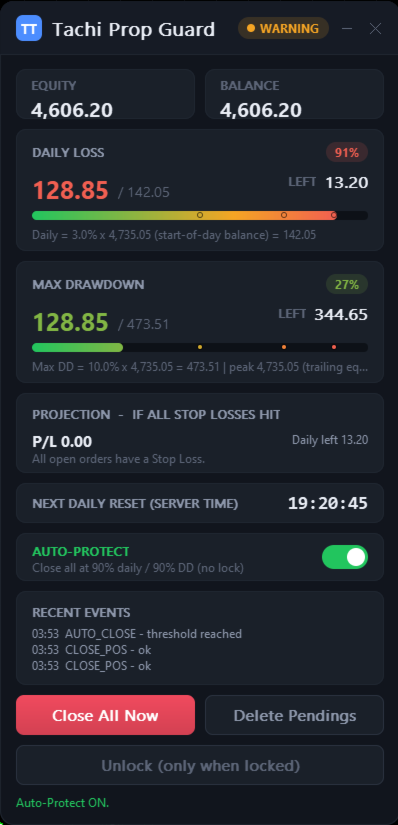
A calculator tells you where the limits are. Tachi Prop Guard keeps watching them while you trade, as a risk manager for MetaTrader 5.
- Tracks daily loss and max drawdown against your limits, in percent or in account currency
- Daily baseline: start-of-day balance, start-of-day equity, or the higher of the two. Drawdown: static, trailing by equity peak or trailing by balance peak
- Monitor mode only watches. Protect mode can close positions, delete pending orders and lock trading until the next reset
- Projects your loss if all stop-losses are hit, and lists positions with no stop-loss as unbounded risk
- Alerts by popup, push notification and sound, plus a CSV audit log
- No DLLs and no internet access needed
Tachi Prop Guard is my own product, sold on the MQL5 Market for MetaTrader 5 only. If you buy it, I earn money. The free calculator stays free either way.
Frequently asked questions
What is the daily loss limit on The5ers?
Is the max loss static or trailing?
Do floating profit and loss count?
What is the difference between a Daily Pause and a Daily Loss?
Is this an official The5ers tool?
Can I use it for other prop firms?
What is Tachi Prop Guard?
Can Tachi Prop Guard block another EA’s order before it is sent?
Does Tachi Prop Guard guarantee I will not breach a limit or pass a challenge?
Know your limits before you click, and keep watching them after
Check them with the free calculator. Watch them live with Tachi Prop Guard on MT5. Sizing a gold trade? Try the XAUUSD Lot Size Calculator.
Sold on the MQL5 Market. See the disclosure for how this site earns money. Trading is risky and not financial advice: read the risk disclaimer.